Mixing is what you do, like adjust the levels of all your stuff, EQing, etc.
Mastering is doing something else, I don't really know what goes on but it's not mixing. You usually send your track to someone that's Mastering Engineer to get it done.
setting levels on fruity loops?
Forum rules
By using this "Production" sub-forum, you acknowledge that you have read, understood and agreed with our terms of use for this site. Click HERE to read them. If you do not agree to our terms of use, you must exit this site immediately. We do not accept any responsibility for the content, submissions, information or links contained herein. Users posting content here, do so completely at their own risk.
Quick Link to Feedback Forum
By using this "Production" sub-forum, you acknowledge that you have read, understood and agreed with our terms of use for this site. Click HERE to read them. If you do not agree to our terms of use, you must exit this site immediately. We do not accept any responsibility for the content, submissions, information or links contained herein. Users posting content here, do so completely at their own risk.
Quick Link to Feedback Forum

Re: setting levels on fruity loops?
Well the 2 are definitely related. Mastering is done to a final mixdown/mix, the mixdown being the song you exported after setting levels, EQing, arranging etc. They will want at least a 24bit .wav file if possible. More and more people are mastering their own mixes these days, but there's really a different set of tools and skill required. It's also common practise to make "pre-masters" to send to DJs or whatever, basically using a limiter on the final mix to get it at a similar volume to other tunes, but this file should generally not be used for mastering. Some Mastering Engineers do offer a mixdown service too, but it's not that common. Another service that's not as common is Stem Mastering, where you export your drums, bass, vocals, fx separately and send them that way, which offers more flexibility during the mastering process.
Professional Mastering engineers will have years of experience in this field, and often times have thousands invested in just monitoring/room treatment alone. A lot of them are using pro outboard gear to master the tunes, but more and more are using software as well, or sometimes only software. To get an idea of what goes into it, check out Ozone. It's probably the most common mastering plugin in use today (but by no means the only one): http://www.izotope.com/products/audio/ozone/
When getting things mastered, the important bit is giving them "headroom" to work in, as in making sure your final mix isn't clipping and generally is peaking under 0dB... at least -3dB but some MEs will prefer more like -6/8dB. Even -15dB should be fine really, but by all means get it as loud as you want without clipping. That's where mixing comes in. Setting the levels, EQing, compressing, to make sure each element in the mix is in its own space, and not fighting for room, that will allow you to get a louder mixdown which leads to a nicer and louder master. They can fix most of that stuff in the mastering process, but it requires turning the overall volumes down, so the master will be quieter.
Check this out for some general tips on mixing, from a mastering engineer's point of view: http://www.onlinemastering.dk/pdf/mixdo ... g-tips.pdf
Professional Mastering engineers will have years of experience in this field, and often times have thousands invested in just monitoring/room treatment alone. A lot of them are using pro outboard gear to master the tunes, but more and more are using software as well, or sometimes only software. To get an idea of what goes into it, check out Ozone. It's probably the most common mastering plugin in use today (but by no means the only one): http://www.izotope.com/products/audio/ozone/
When getting things mastered, the important bit is giving them "headroom" to work in, as in making sure your final mix isn't clipping and generally is peaking under 0dB... at least -3dB but some MEs will prefer more like -6/8dB. Even -15dB should be fine really, but by all means get it as loud as you want without clipping. That's where mixing comes in. Setting the levels, EQing, compressing, to make sure each element in the mix is in its own space, and not fighting for room, that will allow you to get a louder mixdown which leads to a nicer and louder master. They can fix most of that stuff in the mastering process, but it requires turning the overall volumes down, so the master will be quieter.
Check this out for some general tips on mixing, from a mastering engineer's point of view: http://www.onlinemastering.dk/pdf/mixdo ... g-tips.pdf
Re: setting levels on fruity loops?
this music business is a lot more complex than i first realised. I tend to drop all my levels and listen to headphones as loud as possible then arrange sounds,and set volumes (occasionally EQing sounds) then once done i normalise it! i render into mp3,shood i use wav?
as for this headroom talk i think i understand what it means but to check if i hav a sub bass and a kick,do i take cut all lower frequencies on the kick so the sub can be heard clearly? or am i missing the point
as for this headroom talk i think i understand what it means but to check if i hav a sub bass and a kick,do i take cut all lower frequencies on the kick so the sub can be heard clearly? or am i missing the point
Re: setting levels on fruity loops?
Well don't worry too much about the mastering process, just focus on getting a good solid mix. Also, don't put too much focus on making it loud, it can always be made louder later... plus, that's what gain and volume knobs on mixers/stereos are for.swoggles wrote:this music business is a lot more complex than i first realised. I tend to drop all my levels and listen to headphones as loud as possible then arrange sounds,and set volumes (occasionally EQing sounds) then once done i normalise it! i render into mp3,shood i use wav?
as for this headroom talk i think i understand what it means but to check if i hav a sub bass and a kick,do i take cut all lower frequencies on the kick so the sub can be heard clearly? or am i missing the point
then once done i normalise it! i render into mp3,shood i use wav?
Well, that's what I meant with "pre-masters" - limiting/normalising/compression on the final mix. People do different things, it's personal choice. Some just run it through a limiter and that's it, which should be fine if you have a solid mix. Don't push it too hard though, you don't want a huge solid square as your tune, there should still be peaks.
You should only be applying offline processing (as in a wave editor, outside your DAW) to uncompressed formats like .wav or .aiff. Then you can render that as an MP3 file, but always keep the uncompressed one too, and make sure your project is backed up so you can change it and render it again. FL's ZLP Zipped Loop Package is great for that.
if i hav a sub bass and a kick,do i take cut all lower frequencies on the kick so the sub can be heard clearly? or am i missing the point
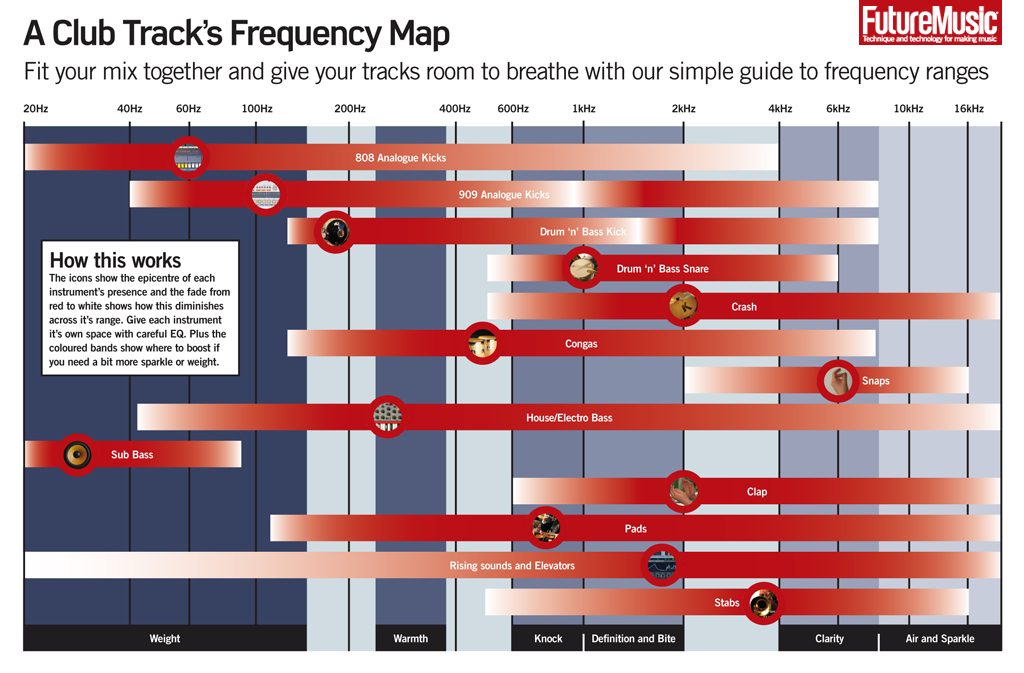
Yeah that's the basic idea. It changes for every sound though, and it's really a creative decision sometimes. Think of it like carving out a room so every sound sits in its own section, from roughly 20hz-20,000khz, (but realistically more like ~35hz-16,000khz). If you have a pure sub bass going from 40hz-150hz, it's going to be clashing with your kick drums at the very least. So remove the unneeded frequencies of whichever sound you do not want dominating. It's hard to give exact numbers, but in that case I would probably apply a low pass on the sub bass and remove everything above 60hz, and then apply a high pass on the kick and remove everything below 70hz or so and adjust to taste. It will be different probably every time though, just watch where those frequencies are peaking in the spectral analysis of the EQ2 plugin or whatever you're using and you can see where they are fighting each other.
You can also use notch filters within the EQ to carve out tiny little sections, like removing only between 200-225hz, which is great for layering sounds. For example, that would be handy if it's not a pure sub bass you're using but a sound that has both bass and harmonic content you want to actually hear in the mix.
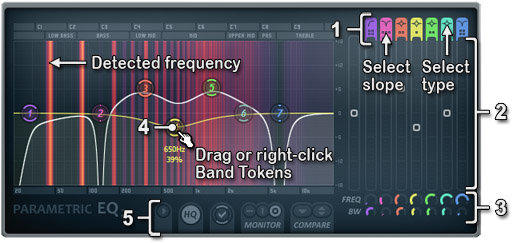
The Parametric EQ 2 is great for this, but there's some stuff that's a bit hidden. Check this pic out, the part on the upper right "Select Type" and "Select Slope" is important, but not labelled clearly: http://flstudio.image-line.com/help/htm ... EQ2_80.jpg
The slope will allow you to make much sharper or broader adjustments as will using the mousewheel on a particular "band token". I would avoid sharp cuts when possible as you'll find it has a tendency to make sounds dull. Sometimes you don't want to completely cut the frequencies, but rather just bring them down a little.
Check this out, general info on the frequencies of common instruments/sounds:
http://cdn.mos.musicradar.com/images/le ... _dsktp.jpg
http://www.independentrecording.net/irn ... isplay.htm

Re: setting levels on fruity loops?
I think I got more from this thread than the moneyshot one, thank you thank you thank you
Re: setting levels on fruity loops?
agreed,u are a wise man,i wood like to purchase ur knowledge haha im gettin there now,i understand a lot more from that description,sorry if my 100 questions is annoying,as for low pass filters is there Fx for that ( such as when u put flangers,and EQ and the like of in the mixer?) or is it the little bits and bobs on the bottom right of the mixer? stepping back from all this technical stuff and focusing on the songs them selves,i have noticed a vast improvement from the old stuff i tried to make,my sounds sound fuller,with every song,which is very much the help of this forum,so cheers guys,especially you wormcode,cheers for sharing the knowledge
Re: setting levels on fruity loops?
Sure, any time. Remember it's general info though, definitely find your own method and way of doing things.
About the filter, I was talking about the low pass filter in the Parametric EQ2 plugin. An EQ is basically a filter, just a more precise collection of filters, and usually EQ offers more specific options than a normal filter for very fine tuning. Just right click those purple and orange "tokens" and you can select the different filter types. I remember the EQ section on the bottom right of the mixer you're talking about, but I never used it. It should be fine for some things, like taking down the bass in a sound, but I'd recommend using the EQ2 for precision. The FL LovePhilter is also really good for making some crazy sounds (especially with the envelope and LFO sections), but it can do a simple high cut/low cut too.
Here's a couple of more filters and EQs I like (freeware too):
http://www.admiralquality.com/products/NaiveLPF/
http://www.cableguys.de/filter-shaper.html
http://software.spl.info/download/ (EQ - free ranger at the very bottom)
http://varietyofsound.wordpress.com/vst-effects/ (BootEQ)
In fact get all the plugins at varietyofsound if you don't already have them.
About the filter, I was talking about the low pass filter in the Parametric EQ2 plugin. An EQ is basically a filter, just a more precise collection of filters, and usually EQ offers more specific options than a normal filter for very fine tuning. Just right click those purple and orange "tokens" and you can select the different filter types. I remember the EQ section on the bottom right of the mixer you're talking about, but I never used it. It should be fine for some things, like taking down the bass in a sound, but I'd recommend using the EQ2 for precision. The FL LovePhilter is also really good for making some crazy sounds (especially with the envelope and LFO sections), but it can do a simple high cut/low cut too.
Here's a couple of more filters and EQs I like (freeware too):
http://www.admiralquality.com/products/NaiveLPF/
http://www.cableguys.de/filter-shaper.html
http://software.spl.info/download/ (EQ - free ranger at the very bottom)
http://varietyofsound.wordpress.com/vst-effects/ (BootEQ)
In fact get all the plugins at varietyofsound if you don't already have them.
Who is online
Users browsing this forum: No registered users and 0 guests