Hey,
I want to share some knowledge, tips how to improve your room acoustics. Recently we DIY our simple project studio so I will share our experience we gained. Also If someone have own opinion about thing please contribute together.
I wrote short article for audiotuts. You can check it if you want to find out that you need to do acoustic measurements.
EQUIPMENT
http://audio.tutsplus.com/tutorials/bus ... asurement/
Next post will be how to analyze measurements data and what decision to make.
Getting the measurements
With software you have couple of tools to make decisions about acoustic.
Better Room Acoustic
Forum rules
By using this "Production" sub-forum, you acknowledge that you have read, understood and agreed with our terms of use for this site. Click HERE to read them. If you do not agree to our terms of use, you must exit this site immediately. We do not accept any responsibility for the content, submissions, information or links contained herein. Users posting content here, do so completely at their own risk.
Quick Link to Feedback Forum
By using this "Production" sub-forum, you acknowledge that you have read, understood and agreed with our terms of use for this site. Click HERE to read them. If you do not agree to our terms of use, you must exit this site immediately. We do not accept any responsibility for the content, submissions, information or links contained herein. Users posting content here, do so completely at their own risk.
Quick Link to Feedback Forum
Better Room Acoustic
Last edited by Gilus on Fri Mar 01, 2013 10:05 am, edited 4 times in total.
-
test_recordings
- Posts: 5079
- Joined: Tue Mar 10, 2009 5:36 pm
- Location: LEEDS

Re: Better Room Acoustic
Room acoustics make up such an important part of the monitoring chain, big up on sharing the knowledge hopefully people will put this to good use! 
Soundcloud
Online Mastering//FAQ//Studio
Evolution Mastering (Analogue/Digital) : 1st track Free sample + 50% off.
What Is Mastering?
http://www.facebook.com/outbounduk
Online Mastering//FAQ//Studio
Evolution Mastering (Analogue/Digital) : 1st track Free sample + 50% off.
What Is Mastering?
http://www.facebook.com/outbounduk
Re: Better Room Acoustic
Frequency Response
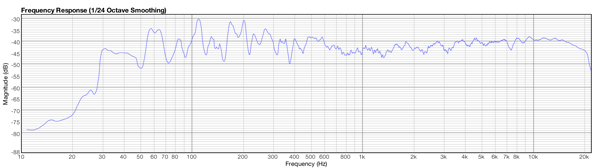
This measurement shows how the room is responding to various frequencies. Peaks or troughs show reinforcement or cancellation at specific frequencies. If you see big peak or trough in the graph it means you have problem in this specific frequency. Your room amplifies that frequency (peak) or cancel each other (trough). It is result of soundwaves sum after reflection from walls, celling, your desk. Graph must be as smooth as possible.
Reverberation time
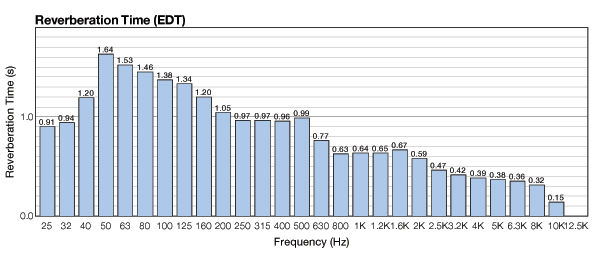
This is the time it takes for an initial sound to decay a certain number of decibels. For example, RT-60 is the time that it takes a sound to decay 60 dB. My measurement result makes it possible to see the RT-60 times across the frequencies and identify any frequencies that are problematic.
Cumulative Spectral Decay
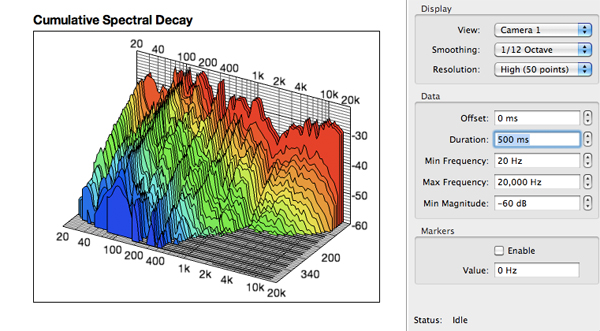
This measurement shows the combination of the frequency responce along with the decay times for specific frequencies – ideal for understanding low frequency decay in a room and see effects of resonances. In this picture you can see problems in mid range and low frequancies. It decay much loger time (up to 400 ms) than high frequncies (ends about 200 ms). This reflect in you mix as you hear boomy bass and on the other system/room it may have weak bass.
Conclusion
We made measurments and we have results. We know we have problems in mid and low frequencies so in next post I will write how to DIY acoustic panel and how to place it for best performance to reduce acoustic problem.
This measurement shows how the room is responding to various frequencies. Peaks or troughs show reinforcement or cancellation at specific frequencies. If you see big peak or trough in the graph it means you have problem in this specific frequency. Your room amplifies that frequency (peak) or cancel each other (trough). It is result of soundwaves sum after reflection from walls, celling, your desk. Graph must be as smooth as possible.
Reverberation time
This is the time it takes for an initial sound to decay a certain number of decibels. For example, RT-60 is the time that it takes a sound to decay 60 dB. My measurement result makes it possible to see the RT-60 times across the frequencies and identify any frequencies that are problematic.
Cumulative Spectral Decay
This measurement shows the combination of the frequency responce along with the decay times for specific frequencies – ideal for understanding low frequency decay in a room and see effects of resonances. In this picture you can see problems in mid range and low frequancies. It decay much loger time (up to 400 ms) than high frequncies (ends about 200 ms). This reflect in you mix as you hear boomy bass and on the other system/room it may have weak bass.
Conclusion
We made measurments and we have results. We know we have problems in mid and low frequencies so in next post I will write how to DIY acoustic panel and how to place it for best performance to reduce acoustic problem.
Who is online
Users browsing this forum: No registered users and 0 guests