Page 1 of 1
Connecting digital piano to Ableton
Posted: Thu Sep 22, 2011 4:45 pm
by FruitFlesh
Hi guys, I have to say I am going stir crazy trying to connect my piano to Ableton atm.

Just at the point of tears/screaming at it. Bought the midi 5 prong cable, connected it to the laptop and went into preferences like the few tutorials on youtube show. On the inputs, all they show is 'USB midi' so selected that...all the way down to 6 - even on the outputs. Got the keyboard icon in the corner highlighted, and the track is armed. Is there something I am doing wrong/missing out? Sorry, just want this to work so bad, I am dying for Ableton to recognise keys being pressed

.
My piano is about like, 13 years old? Kurzweil RG200. Has midi ports so shouldn't be a problem right?
Thanks. J x
Re: Connecting digital piano to Ableton
Posted: Thu Sep 22, 2011 10:40 pm
by RandoRando
are you sure your connected to the midi Out on your piano? and how did you hook it up to your pc, just a midi to usb adapter?
Re: Connecting digital piano to Ableton
Posted: Thu Sep 22, 2011 11:17 pm
by Sine69
Have you tried closing Live and reopening it? Midi stuff won't work if it gets plugged in while live is already open.
Besides that I can't think of anything. Live is usually pretty good at detecting controllers in my experience.
Re: Connecting digital piano to Ableton
Posted: Fri Sep 23, 2011 1:54 am
by FruitFlesh
@RandoRando: Definitely connected midi Out. My piano's instructions say it's Out to In and In to Out? (To me that doesn't make sense but it says so in the book) It's a 5 prong going straight to USB, straight to my laptop.
@Sine69: I've restarted the laptop and checked preferences. Am I supposed to insert a midi track and use a plugin or something?
Re: Connecting digital piano to Ableton
Posted: Fri Sep 23, 2011 2:15 am
by Shum
FruitFlesh wrote:Am I supposed to insert a midi track and use a plugin or something?
Sounds like a good idea.
Re: Connecting digital piano to Ableton
Posted: Fri Sep 23, 2011 2:19 am
by FruitFlesh
LOL, sorry I should mention I did try it earlier but it's not even recognised the piano first yet :S
Re: Connecting digital piano to Ableton
Posted: Fri Sep 23, 2011 2:27 am
by Shum
From your description of the inputs sounds like it has. Are the MIDI connections properly connected? (MIDI cable out to piano in and vice versa)
Re: Connecting digital piano to Ableton
Posted: Fri Sep 23, 2011 2:32 am
by FruitFlesh
Okay...restarted laptop for the 15th time today, thinking it might 'jog' ableton to recognise it. I've done all the steps above, midi is connected, keyboard icon is on, preferences is 'USB midi' and yes, even put a midi track earlier and vst plugin, I was just doubting myself as I've not hooked this up before. Still nothing showing up on the on screen keyboard on the left :[
Re: Connecting digital piano to Ableton
Posted: Fri Sep 23, 2011 2:38 am
by FruitFlesh
Shum wrote:From your description of the inputs sounds like it has. Are the MIDI connections properly connected? (MIDI cable out to piano in and vice versa)
Yup, definitely! Infact, checked it half a dozen times I'm starting to get neurotic over it lol.
Re: Connecting digital piano to Ableton
Posted: Fri Sep 23, 2011 2:41 am
by Shum
You shouldn't need to restart your laptop at all. So long as your physical connections are sound and Ableton sees your MIDI device, it should be working fine. The problem is either the piano settings (which I doubt, as they're usually pretty idiot proof) or with your understanding of how MIDI works in Ableton.
edit: could be the drivers on your MIDI to USB device (or the device itself for that matter). what are you using?
Re: Connecting digital piano to Ableton
Posted: Fri Sep 23, 2011 2:54 am
by FruitFlesh
Ok, reaaaly weird... for some reason Ableton has finally recognised it!?! Don't know why it didn't work before!?!

Haha, I did make sure they were all properly jammed in.

Sounds slightly glitchy though and I'm going to have a look on what to do about the latency, egh. But at least ableton's found it

I'll definitely be the first to admit I'm an idiot at times.

Just hope it's not all the time! Small victory FINALLY after a lot of back and forth frustration.
Re: Connecting digital piano to Ableton
Posted: Fri Sep 23, 2011 2:55 am
by Shum
Re: Connecting digital piano to Ableton
Posted: Fri Sep 23, 2011 3:08 am
by FruitFlesh
Thank you!

Re: Connecting digital piano to Ableton
Posted: Fri Sep 23, 2011 9:16 am
by RandoRando
R u using asio4all to deal w latency?
Re: Connecting digital piano to Ableton
Posted: Fri Sep 23, 2011 11:05 am
by FruitFlesh
Hey Rando! I downloaded it about an hour ago but when I switch to it, I lose the sound from the piano? I can see activity when I press the keys but no sound. Is there any way around this?
Re: Connecting digital piano to Ableton
Posted: Fri Sep 23, 2011 11:35 am
by FruitFlesh
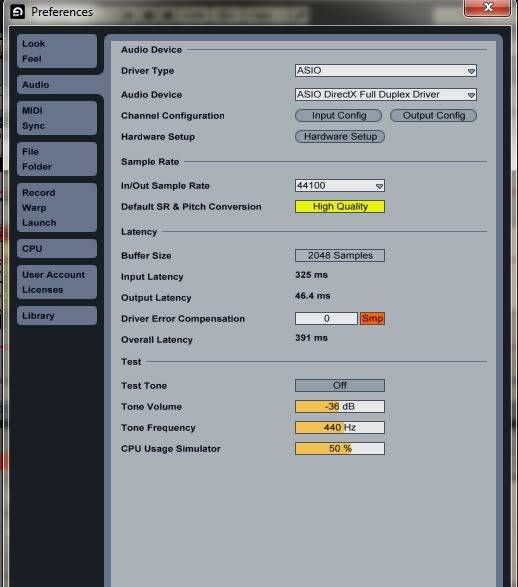
Using what I've got already Asio DirectX Full Duplex Driver... notes are clipping and crackling. Well.... actually, everything is clipping and crackling when I playback. Can't change the buffer size (screen shot attached) and adjusting the track delay isn't doing anything. If I can get the asio4all to work and see how that sounds...
Re: Connecting digital piano to Ableton
Posted: Fri Sep 23, 2011 12:40 pm
by Electric_Head
asio4all will allow you to set your buffer size.
You`ll notice the latency issue disappear as your raise the buffer.
Re: Connecting digital piano to Ableton
Posted: Fri Sep 23, 2011 1:12 pm
by FruitFlesh
I just gave it another shot. Yeah... normally the 'buffer size' setting is highlighted in yellow and you can move it. But it's all greyed out. Ermm when I have changed it to asio4all, I am getting no sound whatsoever in playback. Test tone doesn't even make a noise when I turn it on.
Re: Connecting digital piano to Ableton
Posted: Fri Sep 23, 2011 1:26 pm
by Electric_Head
that`s annoying
Re: Connecting digital piano to Ableton
Posted: Fri Sep 23, 2011 2:15 pm
by FruitFlesh
Okay...had to go the long way round and found a sort of quick fix from googling another forum.
If anyone else has the same problem it's: Preferences > Hardware > Select 'Realtek High Definition Audio' (I had 2 options and the other one killed all sound)
Tick 'Always Resample 44.1kHz <-> 48kHz' . Reboot. Delay is all but gone

Just comphensated my overall latency by adjusting the delay.
Because of the quality, I think changing my In Out sample rate at 48000...sounded better than it was at 41000. Not sure if that made the pops and crackles go from my midi but it seemed to sound a little better in playback :S. (Still really new to all this)

I called it a quick fix because my audio tracks still have cracks and pops in them but I think if I don't find the answers myself I should really ask that separately in a new topic
Anyway, I'm really glad I joined here, everyone's really cool and helpful :]
