Page 1 of 1
Varying LFO rate in Reason
Posted: Mon Mar 24, 2008 12:34 pm
by boyd
Hi there, new to the forum. I've always been into music, played guitar for years and write songs for my band, just recently got a midi keyboard to start getting down some dubstep ideas of my own using reason. I've liked drum and bass for a while but only clocked on to dubstep since seing skream a couple months ago but I'm now suitably addicted.
Anyway what I'd like to ask is.. I use reason, and I've figured out using some tutorials how to make standard wobble basslines, but is there a way to alter the LFO1 rate of a synth (this is using the NN-XT sampler) on the fly, or even within one track? At the moment if i want half the bar at 3/16 and half the bar at 1/8 I'm having to create seperate identical instruments and tracks, one at the first speed and one at the second. I noticed in the 'bible' sticky it's mentioned that you can control the rate using the pitch bender, but I'm not sure if that applies to reason?
This is pretty long and annoying, especially if I want a third or a fourth rate of one synth sound. Am I being stupid here, or is this just the way reason rolls? I'm thinking of switching up to fruity loops anyway to get messy with my own samples, would fl do this (the lfo business) better? Sorry for the ignorance, I've only had reason a couple months and haven't got anyone to teach me!
Cheers

Posted: Mon Mar 24, 2008 12:39 pm
by tems
You should be able to draw automation lanes to do the changes for you
check this
http://www.youtube.com/watch?v=qz4jfBFMzEQ&NR=1
Hope that helps
Posted: Mon Mar 24, 2008 1:05 pm
by boyd
Sick, I thought there must be a way to automate it but didn't know how to automate that particular knob. I'll check the video now, thanks.
edit - Right, so I seem to be able to press record and alter parameters such as the frequencey and master volume, but not the bottom left LFO1 rate knob when all the samples (the blue bit) are selected. When during record I change the frequency or any of the 'global controls', a new automation track is created to record these changes. This doesn't happen with the LFO1 rate knob.. Infact I can't alter any of the effects in the NN-XT drop down box using track automation, anyone know how to? Hope I'm making sense..
Cheers
Posted: Mon Mar 24, 2008 1:07 pm
by thedeadmethod
check this
TL;DW
To make any knob tweakable in real time, right click it and edit remote override mapping. check "learn from control surface" and twist the desired knob/wheel/slider on your controller. that's it, they're linked.
if you want to write in changes rather than play them, just right click and edit automation. the video is for reason 3, but new in reason 4 is vector automation, so you can just click in start and finish points instead of dragging or whatever.
edit: seems i'm 2 minutes late.
Posted: Mon Mar 24, 2008 1:21 pm
by boyd
Thanks TheDeadMethod.
Thing is, what you describe works fine for the main controls at the top, but the same right click menu doesn't come up for the knobs in the drop-down bit where you alter the LFO1 rate. There isn't the same option to edit remote override mapping..
Posted: Mon Mar 24, 2008 1:29 pm
by thedeadmethod
drop down menu? where are you trying to right click?

Posted: Mon Mar 24, 2008 1:35 pm
by boyd
I'm using NN-XT, not sub-tractor
Posted: Mon Mar 24, 2008 1:38 pm
by boyd
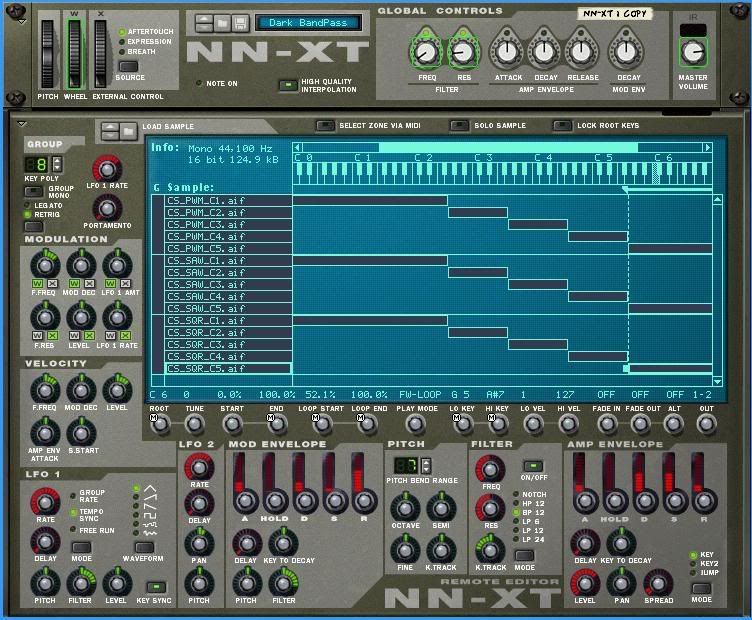
So I'm talking about the bottom left LFO1 rate knob. As you can see the controls at the top work fine to be automated as you described.
Posted: Mon Mar 24, 2008 1:45 pm
by thedeadmethod
i'll be damned. i had never tried automating those, so i had no idea that you couldn't do that. hmm. i tried linking the synced lfo1 mod out from the subtractor to the lfo1 mod in on the nnxt and it's working to a degree, but it's very choppy sounding for some reason. i'm gonna keep fucking with it and see if i can't work something out.
EDIT:
okay. try this.

relevant parameters are the LFO rate in the modulation box and again in the LFO 1 box.
with the modulation LFO rate (the green one) at 0% and the mod wheel all the way down, find the slowest you're going to want the wobble with the LFO 1 rate knob in the bottom left (the red one). then, with the mod wheel all the way up, turn on the LFO knob in the modulation box (check the W box) and crank it up to find the fastest you want the wobble. after that, you should be able to adjust to anywhere inbetween with the mod wheel. don't just max out the modulation LFO, cause it gets wayyy to fast to be useful at all.
Posted: Mon Mar 24, 2008 2:37 pm
by boyd
Awesome, that seems to work great. That'll solve a lot of problems for me, thanks for your help!
It's still quite useful to have seperate tracks for different rates as you can give each one different sounds too (sounds to me like skream does this a lot), but when you just want one sound with a varying rate this is much easier.
Posted: Mon Mar 24, 2008 7:59 pm
by press
this is more easily achieved in an nn-19. you can just automate the rate knob with out having to route it to the mod wheel, both would work but if your not utilizing the extra features or anything special in the nn-xt you might as well switch it to the nn-19. i find the nn-19 easier and better suited for wobble bass cuz the lfos are easier to automate.
Posted: Mon Mar 24, 2008 9:47 pm
by abstractsound
malstrom is easy as well and then you can create your own synth patches

Posted: Tue Mar 25, 2008 1:04 am
by thedeadmethod
if your not utilizing the extra features or anything special in the nn-xt you might as well switch it to the nn-19.
amen. i love the nn19 because you can change the octave and sample start so easily.
Posted: Tue Mar 25, 2008 9:21 am
by serox
NN-19 all the way

Posted: Tue Mar 25, 2008 2:25 pm
by psyphon
Not sure if this'll work, but I've done it with other thing in Reason.
Create a Combinator and chuck your NN XT into the Combinator, then in the Combinator, click show programmer on the control panel. Then select the NN XT from the menu and in the modulation routing box on the left, select Rotary 1 and then in the drop down window next to it, you should have all the parameters which are assignable on the NN XT.
Hope it works!
Posted: Tue Mar 25, 2008 2:41 pm
by serox
psyphon wrote:Not sure if this'll work, but I've done it with other thing in Reason.
Create a Combinator and chuck your NN XT into the Combinator, then in the Combinator, click show programmer on the control panel. Then select the NN XT from the menu and in the modulation routing box on the left, select Rotary 1 and then in the drop down window next to it, you should have all the parameters which are assignable on the NN XT.
Hope it works!
Good idea!